Why WhatsApp matters so much in the UAE
For many customers in the UAE, WhatsApp is the default way to contact a business. They message a real estate agent about a listing, ask a clinic for an appointment, check a restaurant's delivery times or follow up on an online order — and they expect a reply in minutes, not hours.
Speed matters because customers often message several businesses at once — the first clear, helpful reply usually wins the enquiry. Automation makes sure every message gets an instant response, even at night, at weekends or during busy periods, while your team focuses on the conversations that need a person.
The free WhatsApp Business app works for a small shop with one phone. As soon as you have several staff, hundreds of chats a day or want to connect WhatsApp to your website, CRM or booking system, you need the WhatsApp Business API (officially the WhatsApp Business Platform, usually through Meta's Cloud API).
WhatsApp Business app vs API
| Feature | WhatsApp Business app | WhatsApp Business API |
|---|---|---|
| Users | One phone plus a few linked devices | Many agents through a shared inbox or CRM |
| Automation | Basic greeting and away messages | Full chatbots, flows and AI assistants |
| Integrations | None | Website, CRM, e-commerce, booking and ERP systems |
| Bulk messages | Limited broadcast lists | Approved templates to opted-in customers at scale |
| Cost | Free | Per-message charges from Meta plus setup |
Popular use cases for UAE businesses
Real estate: instant lead response
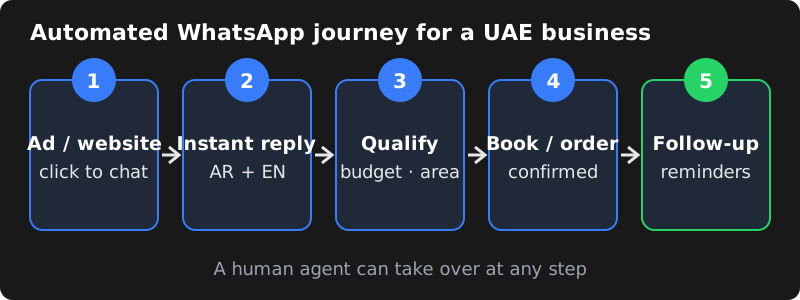
Leads from property portals, Meta ads and your website get an instant WhatsApp reply with the listing details, a few qualifying questions (budget, area, move-in date) and an option to book a viewing. Hot leads are passed to an agent straight away.
Restaurants and cafés: orders and reservations
Customers can see the menu, place an order, reserve a table and receive confirmation — without staff typing the same answers again and again during busy hours.
Clinics and salons: bookings and reminders
Automated appointment confirmations and reminders reduce no-shows, and patients or clients can reschedule with a tap.
E-commerce: order and delivery updates
Order confirmations, payment links, dispatch and delivery updates are sent automatically from Shopify, WooCommerce or your custom store, with cash-on-delivery confirmation where needed.
Service businesses: quotes and follow-ups
Collect requirements, share brochures, send quotes and follow up automatically if the customer goes quiet.
Arabic and English templates
Many UAE customers are comfortable in English, but offering Arabic builds trust and widens your reach. With the API you can:
- Create each message template in Arabic and English and send the right one based on the customer's preference.
- Start chats with a simple language choice button.
- Use an AI assistant that understands the customer's language and replies in it.
Write templates naturally rather than translating word for word, and make sure right-to-left Arabic text displays correctly in your inbox and any CRM you connect.
How to set up the WhatsApp Business API
- Create a Meta business account (Meta Business Suite / Business Manager) for your company.
- Prepare a phone number that will be used for the API. It must be able to receive an SMS or call for verification.
- Create a WhatsApp Business Account and connect the number through the Cloud API or a provider.
- Complete Meta business verification with your trade licence and business details to unlock higher limits and features.
- Set up your display name and profile — logo, description, address, website and hours.
- Create and submit message templates for confirmations, reminders and offers.
- Build your flows and integrations — auto-replies, chatbot, CRM, store or booking system.
- Test, train your team and go live.
What it costs
There are two parts to the cost:
- Meta's messaging charges: Meta charges per template message, with different rates for marketing, utility and authentication categories, and rates vary by country. Replies inside a conversation the customer started are generally free. Pricing changes from time to time, so check Meta's current rate card for the UAE before planning large campaigns.
- Setup and automation: the work to connect the API, build flows, integrate your systems and maintain them. Providers charge either a one-time setup fee, a monthly platform fee, or both.
To keep costs predictable, use utility templates (order and booking updates) for operational messages, keep marketing messages targeted to opted-in customers, and let customers start conversations through click-to-WhatsApp buttons and ads where possible.
Opt-in rules and quality rating
- Collect clear opt-in before sending business-initiated messages
- Make it easy for customers to stop promotional messages
- Send relevant messages — not daily blasts
- Respond quickly to keep conversations healthy
- Avoid buying or importing contact lists
- Monitor your number's quality rating in WhatsApp Manager
Numbers that get many blocks or reports can have their messaging limits reduced, so respect customer preferences from day one.
Adding an AI assistant
An AI WhatsApp assistant can answer questions about your services, prices, locations and policies using your own information, qualify leads and hand over to a human for complex requests. It works best with clear guardrails: answer only from approved content, escalate when unsure and keep a human in the loop for bookings and payments. Learn more in our guide to building an AI chatbot trained on your business data.
Connecting WhatsApp to your systems
The real value of the API comes from connecting WhatsApp to the tools you already use, so messages are triggered automatically and every conversation is recorded:
| System | What the integration does |
|---|---|
| CRM (HubSpot, Zoho, Salesforce, custom) | Creates leads from new chats, logs conversations and triggers follow-ups |
| Property portals and Meta lead ads | Sends an instant WhatsApp reply to every new enquiry |
| Shopify / WooCommerce | Order confirmation, payment links, COD confirmation and delivery updates |
| Booking and clinic systems | Appointment confirmations, reminders and rescheduling |
| Google Sheets or a database | Simple lead lists and reporting for smaller teams |
Tools such as n8n, Make or custom code can connect these systems. For a comparison, see n8n vs Zapier vs Make.
Measuring results
Track a few simple numbers from the first week so you can see whether automation is paying off:
- First response time: how quickly a new enquiry gets a reply (automation should make this seconds).
- Lead-to-appointment or lead-to-order rate: the share of chats that turn into bookings or sales.
- No-show rate: for clinics, salons and viewings, before and after reminders.
- Template read and reply rates: which messages customers actually engage with.
- Hand-over rate: how often the bot passes chats to a human, and why.
Review these monthly and improve the flows that underperform. Small wording changes to templates and quick-reply buttons often make a noticeable difference.
Common mistakes to avoid
- Automating everything on day one: start with one or two flows, learn from real conversations, then expand.
- No human fallback: customers get frustrated if they cannot reach a person. Always offer a clear "talk to our team" option.
- Treating WhatsApp like email marketing: frequent promotional blasts lead to blocks and a lower quality rating.
- Ignoring the 24-hour window: after a customer's last message, you need an approved template to start a new conversation.
- Inconsistent business details: different names or addresses across your trade licence, website and Meta profile slow down verification.
Getting started
Start with one high-value flow — for example instant replies to property leads or booking reminders — measure response times and conversions, then expand. A good partner will handle Meta setup, templates in Arabic and English, integrations and ongoing tuning, while your team focuses on the conversations that need a human touch.
Frequently asked questions
Can UAE businesses use the WhatsApp Business API?
Yes. Businesses in the UAE can use the official WhatsApp Business Platform after creating a Meta business account, adding a phone number and, for higher messaging limits and features, completing Meta business verification.
Can I send WhatsApp messages in Arabic?
Yes. Message templates can be created and approved in Arabic, English or both, and chatbot replies can detect the customer's language and answer in it.
How much does the WhatsApp Business API cost in the UAE?
Meta charges per template message, with different rates for marketing, utility and authentication messages, and rates differ by country. Replies within a conversation the customer started are generally free. Check Meta's current rate card for the UAE before planning a campaign. Setup and automation services are charged separately by your provider.
Can I use my existing WhatsApp number?
Usually yes, but a number moved to the API stops working in the regular WhatsApp app on a phone. Many businesses use a separate number for automation, or migrate carefully after planning how staff will handle chats.
Do I need customer consent to send WhatsApp messages?
Yes. WhatsApp requires customers to opt in before you send them business-initiated messages, and promotional messages should always be relevant and easy to stop. Following these rules protects your number's quality rating.
