What is the WhatsApp Business API?
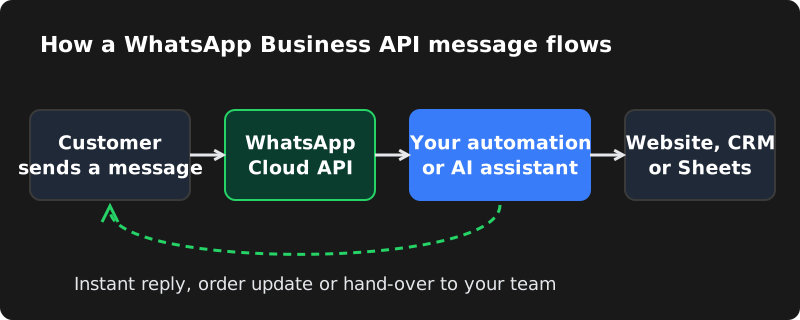
The WhatsApp Business API — officially part of the WhatsApp Business Platform from Meta — is a way for software to send and receive WhatsApp messages on behalf of your business. Instead of someone typing every reply on a phone, your website, online store, CRM or chatbot can talk to customers automatically.
There is no separate "API app" to download. You connect a phone number to Meta's platform, and then use a dashboard or a custom integration to manage conversations. Today most businesses use Meta's Cloud API, which is hosted by Meta, so you do not need your own servers to run WhatsApp itself.
WhatsApp Business app vs WhatsApp Business API
| WhatsApp Business app (free) | WhatsApp Business API | |
|---|---|---|
| Best for | Very small businesses, one person replying | Growing businesses, teams, online stores |
| Users | A phone plus a few linked devices | Many team members through a shared inbox |
| Automation | Greeting, away message, quick replies | Full chatbots, AI replies, flows, integrations |
| Order / booking notifications | Manual | Automatic from your website, store or CRM |
| Broadcasts | Limited, only to contacts who saved your number | Approved templates to opted-in customers at scale |
| Cost | Free | Pay Meta per template message; setup and tool costs |
If you get only a handful of messages a day, the free app is fine. If you are missing messages, copying order details by hand, or want replies at 11 pm on a Sunday, the API is the next step.
What you can do with it
- Instant replies to common questions
- Order confirmations and shipping updates
- Appointment and booking reminders
- Payment links and payment reminders
- OTPs and login codes
- Festival offers to opted-in customers
- An AI assistant trained on your business
- Leads saved to Google Sheets or a CRM
- A shared inbox for your whole team
- Hand-over from bot to a human agent
Example: a clinic in Hyderabad
A patient sends "Hi" at 10 pm. The bot replies with buttons: Book appointment, Timings & location, Talk to reception. The patient picks a slot, the booking is saved to the clinic's calendar, and the next morning a reminder message goes out automatically. Reception only steps in for questions the bot cannot answer.
Use cases by industry
| Business | What to automate first |
|---|---|
| Online store | Order confirmation, shipping and delivery updates, cash-on-delivery confirmation, abandoned-cart reminders to opted-in customers |
| Clinic or hospital | Appointment booking, reminders the day before, report-ready alerts, timings and location |
| Restaurant or cloud kitchen | Menu with buttons, table reservations, order status, feedback request after delivery |
| Real estate | Project brochures on request, site-visit booking, lead capture to the sales team |
| Coaching centre or school | Admission enquiries, fee reminders, class schedule changes, exam results alerts |
| Salon, spa or gym | Slot booking, reminders, membership renewal alerts, birthday offers |
| Service company | Quote requests, technician visit confirmation, invoice and payment links |
A good rule: automate the three questions you answer most often and the one update customers ask for most. That alone usually saves hours of staff time every week.
How WhatsApp API pricing works
Meta charges for template messages — pre-approved messages that a business sends. Templates fall into three categories, each with its own rate per country:
- Marketing: offers, announcements, re-engagement. The most expensive category.
- Utility: order updates, booking confirmations, payment reminders, account alerts.
- Authentication: one-time passwords (OTPs).
When a customer messages you first, a 24-hour customer service window opens. Normal free-form replies inside that window are generally not charged, and Meta has made some utility messages inside the window free as well. Outside the window, you must use an approved template.
On top of Meta's charges, you may pay for:
- A platform or inbox tool (many providers charge a monthly fee and some add a margin per message), or
- A one-time custom setup that connects the Cloud API directly to your website or CRM, with no per-message markup from a middleman.
What you need to get started
- A Meta Business account (business.facebook.com) for your company.
- Business verification — Meta may ask for documents such as a GST certificate, Udyam registration, shop licence or utility bill in the business name, and checks that your website shows the same business details.
- A phone number that can receive an SMS or call for verification. It can be a new number or an existing one.
- A display name that matches your business, which Meta reviews.
- A website with a privacy policy — this helps verification and builds trust.
- A payment method added to your WhatsApp account for Meta's message charges.
Can I use my existing WhatsApp number?
Often, yes. Traditionally a number used on the API could not be used in the phone app at the same time, so businesses either migrated their number or took a new one for automation. Meta has since introduced options that let some businesses use the WhatsApp Business app and the platform on the same number. Availability and features vary, so check your options before moving a number your customers already know.
Rules you must follow
WhatsApp protects its users strongly. Numbers that spam get restricted or banned. Follow these rules from day one:
- Get opt-in. Only message customers who have agreed to receive WhatsApp messages from you — for example a checkbox at checkout or a "Message us" button they tapped.
- Use templates correctly. Do not label marketing messages as utility to save money; Meta reviews and may re-categorise them.
- Make it easy to stop. Include a way to opt out of promotional messages.
- Watch your quality rating. If many people block or report you, Meta lowers your rating and limits how many people you can message.
- Start slowly. New numbers have messaging limits that increase as you send good-quality messages over time.
Step-by-step: how to set it up
- List your use cases. Which questions do you answer 20 times a day? Which updates do customers ask for?
- Prepare your business documents and make sure your website shows the same business name, address and contact details.
- Create and verify your Meta Business account.
- Connect your number to the WhatsApp Business Platform and set your display name and profile.
- Create message templates (order confirmation, reminder, offer) and submit them for approval.
- Build your flows: welcome menu, FAQs, booking, hand-over to a human.
- Connect your systems — WooCommerce, Shopify, Google Sheets, CRM or an AI model.
- Test everything with real phones before launch, then monitor replies for the first two weeks.
Common mistakes to avoid
- Buying contact lists and broadcasting to people who never opted in.
- Building a bot with no way to reach a human.
- Long, robotic messages — keep replies short and use buttons.
- Forgetting to update answers when prices, timings or offers change.
- Moving your main business number to the API without understanding what changes in the phone app.
How CodeServe can help
We set up the official WhatsApp Business Platform for businesses in Hyderabad and across India and build the automation on top of it:
| Plan | One-time setup | Best for |
|---|---|---|
| WhatsApp Starter | ₹7,999 | Auto-replies, welcome message, menu buttons |
| WhatsApp Business | ₹14,999 | Order, booking and payment messages from your store or website |
| AI WhatsApp Assistant | ₹24,999 | AI replies in English, Hindi and Telugu with human hand-over |
Meta's message charges are billed by Meta directly to your account based on usage.
Frequently asked questions
Is the WhatsApp Business API free?
Access to Meta's Cloud API itself has no separate subscription fee, but Meta charges per template message (marketing, utility and authentication). Replies inside a 24-hour window opened by the customer are generally free. You may also pay for a platform tool or a one-time custom setup.
Do I need a registered company to use the WhatsApp Business API?
You need to be a real, verifiable business. A private limited company is not required — sole proprietors can usually verify with documents such as GST or Udyam registration and a matching website.
Can I send bulk WhatsApp messages with the API?
You can send approved template messages to customers who have opted in. Sending to purchased lists or people who did not agree to receive messages breaks WhatsApp's policies and can get your number restricted.
How long does WhatsApp API setup take?
If your business documents and website are ready, setup usually takes a few days to a week. Business verification and template approval by Meta can sometimes take longer.
