A website isn't a one-time purchase like a signboard. It runs on software that changes constantly — WordPress, plugins, themes, browsers, phones and Google's rules all keep updating. Without regular care, even a well-built site slowly becomes slower, less secure and less visible on Google.
This guide explains what website maintenance actually includes, what happens when it's ignored, and how to decide between doing it yourself and choosing a maintenance plan.
What is website maintenance?
Website maintenance is the regular work that keeps your site secure, fast, working and up to date. Think of it like servicing a car: small, routine checks prevent expensive breakdowns later. It usually covers software updates, security, backups, uptime monitoring, speed, small content changes, SEO health and renewals.
What a good maintenance plan includes
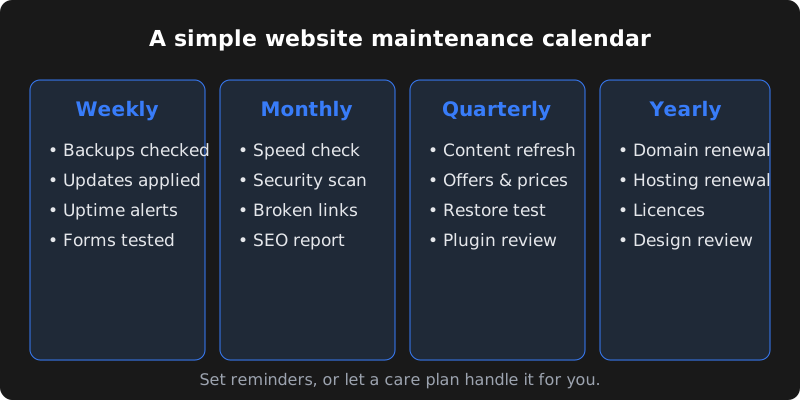
| Task | Why it matters | How often |
|---|---|---|
| Software, theme and plugin updates | Fixes bugs and closes security holes | Weekly or as released |
| Backups | Lets you restore the site if something breaks or gets hacked | Daily or weekly, stored off-server |
| Security monitoring | Blocks attacks, malware and spam sign-ups | Continuous |
| Uptime monitoring | Alerts you when the site goes down | Continuous |
| Speed optimisation | Slow sites lose visitors and rankings | Monthly |
| Content changes | Keeps prices, offers, staff and photos current | As needed |
| SEO health checks | Finds broken links, errors and indexing problems | Monthly |
| Form and checkout testing | Makes sure enquiries and orders actually arrive | Weekly or monthly |
| Renewals | Domain, hosting, SSL and licences don't expire | Yearly |
Updates and security
Most hacked small-business websites are not targeted personally — they are found by automated bots scanning the internet for outdated software. Keeping WordPress, plugins and themes updated is the single most effective protection.
- Update software regularly, after taking a backup
- Remove plugins and themes you don't use
- Use strong passwords and two-factor login for admin accounts
- Give staff only the access they need
- Use a firewall or security plugin and spam protection on forms
- Keep HTTPS (SSL) active on every page
Backups: your safety net
A backup is only useful if it is recent, stored somewhere other than your hosting server, and actually restorable. Many businesses discover their "backup" was months old or stored on the same server that failed.
Speed and uptime
Visitors on mobile data won't wait for a slow site, and Google uses page experience as one of its signals. Over time sites get slower as images, plugins and scripts pile up. Regular maintenance includes compressing images, cleaning the database, caching, and checking Core Web Vitals. Our guide to website speed and Core Web Vitals goes deeper.
Uptime monitoring checks your site every few minutes and alerts you if it goes down — so you hear about problems from a monitor, not from an annoyed customer.
Content changes and SEO health
Outdated prices, old phone numbers, staff who left years ago or a "2022 offer" on the homepage quietly damage trust. Maintenance should include small content updates so your site always reflects your business today.
On the SEO side, monthly checks in Google Search Console catch broken links, pages that dropped out of Google, mobile usability issues and security warnings before they hurt your traffic.
Renewals: domain, hosting and SSL
One of the most common — and most avoidable — disasters is an expired domain. If your domain lapses, your website and email can stop working, and after a grace period someone else can buy it. Keep a simple renewal list:
| Item | Typical renewal | Good practice |
|---|---|---|
| Domain name | Yearly (or multi-year) | Turn on auto-renew; keep it in your business name |
| Hosting | Monthly or yearly | Know who has the login and when it renews |
| SSL certificate | Often free and auto-renewing | Confirm auto-renewal is working |
| Premium plugins / themes | Yearly | Renew the ones you use; remove the rest |
| Business email | Monthly or yearly | Keep billing details up to date |
What happens if you ignore maintenance?
- Security breaches: spam pages, redirects to scam sites, or a Google "This site may be hacked" warning.
- Broken features: forms that silently stop sending enquiries, or checkouts that fail after an update.
- Lost rankings: slow pages, errors and outdated content lose visibility over time.
- Downtime: an expired domain or hosting plan takes the whole site offline.
- Costly rescues: fixing a hacked or broken site usually costs far more than regular care.
Signs your website needs attention now
- You haven't logged in or updated anything in months
- Pages take more than a few seconds to load on your phone
- The contact form hasn't sent an enquiry in a while
- Google or your browser shows a security or "not secure" warning
- Strange pages, links or users appeared that you didn't add
- Prices, phone numbers or staff details are out of date
- You don't know who has the domain and hosting logins
If two or more of these are true, a quick website health check is worth doing before something breaks.
WordPress vs custom sites: maintenance differences
WordPress sites need frequent updates because the core software, themes and plugins are updated often, and outdated plugins are the most common cause of hacks. The upside is that updates are easy to apply when done carefully, with backups first.
Custom-coded sites usually need fewer routine updates, but changes require a developer, and the frameworks and libraries they use still need security updates from time to time. Read more in WordPress vs custom website.
Questions to ask a maintenance provider
- How often do you take backups, where are they stored, and do you test restores?
- Do you test updates before applying them to the live site?
- How quickly do you respond if the site goes down?
- How many hours of content changes are included each month?
- Will I get a monthly report, and what does it show?
- Are the domain and hosting in my name, and will I have all logins?
What a typical month of maintenance looks like
For a small business website on a care plan, a normal month might include:
- Three or four rounds of plugin and theme updates, each after a fresh backup
- Weekly backups stored off-server and one test restore per quarter
- Uptime alerts handled — for example, a short hosting outage reported and resolved
- A few content edits: a new festive offer banner, updated prices, a new team photo
- A monthly report: updates done, uptime, speed score, any security events and recommendations
Most months are quiet — and that's the point. Maintenance is what keeps them quiet.
Extra care for online stores
E-commerce sites need more attention because problems directly cost sales. Beyond the basics, maintenance for WooCommerce or Shopify stores should include regular test orders, checking payment gateway and shipping integrations after updates, monitoring stock and order emails, and making sure WhatsApp or email order notifications still go out. Peak seasons like Diwali sales deserve an extra check before traffic arrives.
Finally, keep a simple document with every login — domain registrar, hosting, website admin, Google accounts and email — stored securely and shared only with people who need it. When a developer or staff member leaves, change the passwords. Many website emergencies become much harder simply because nobody knows where the domain is registered or who has the hosting password.
DIY vs a maintenance plan
| Do it yourself | Maintenance plan | |
|---|---|---|
| Cost | Your time (plus tools) | Fixed monthly fee |
| Skills needed | Comfortable with updates, backups and troubleshooting | None |
| Risk | An update can break the site if not tested | Handled and tested by professionals |
| Best for | Very simple sites, technically confident owners | Busy owners, online stores, sites that bring leads |
CodeServe care plans
Our monthly plans cover maintenance so you can focus on your business:
- Care — ₹1,999/month: plugin, theme and security updates, weekly backups, uptime monitoring, up to 2 hours of content changes and a monthly health report.
- Growth — ₹4,999/month: everything in Care plus monthly SEO work, Google Business Profile updates, social media posts and up to 4 hours of changes.
- Pro — ₹9,999/month: everything in Growth plus ads management, WhatsApp automation support, up to 8 hours of changes and priority support.
Yearly billing saves 15%. See full details on our pricing page.
Frequently asked questions
How much does website maintenance cost in India?
It varies with the size and type of site. Simple business websites often cost a few thousand rupees per month to maintain properly, while online stores and custom sites cost more. CodeServe's Care plan starts at ₹1,999 per month.
Does a new website need maintenance?
Yes. Software updates and security patches are released constantly, even for brand-new sites. Starting maintenance from day one is cheaper than fixing problems later.
Can my website get hacked if it's small?
Yes. Most attacks are automated and look for outdated software, not big brands. Small sites with old plugins are common targets, which is why updates and backups matter.
What happens if my domain expires?
Your website and email can stop working. After the registrar's grace period the domain may become available for anyone to buy, which can be very hard to recover. Turn on auto-renew and keep the domain in your business name.
Can I cancel a CodeServe maintenance plan?
Yes. Monthly plans can be cancelled with notice before the next billing date, as described in our terms.
