First, what do these terms mean?
WordPress is a free, open-source content management system (CMS) used by a large share of the world's websites. You get an admin panel to edit pages, a theme that controls the design, and plugins that add features such as contact forms, SEO tools or an online store (WooCommerce).
A custom website is built from code specifically for your business, usually with modern tools such as React or Next.js for the front end and Node.js, Python or PHP for the back end. Nothing is pre-made — the design and every feature are built for you.
There is also a middle path: a custom-designed WordPress website, where the design is unique but WordPress still provides the editing panel. Many businesses choose this.
Side-by-side comparison
| WordPress | Custom website | |
|---|---|---|
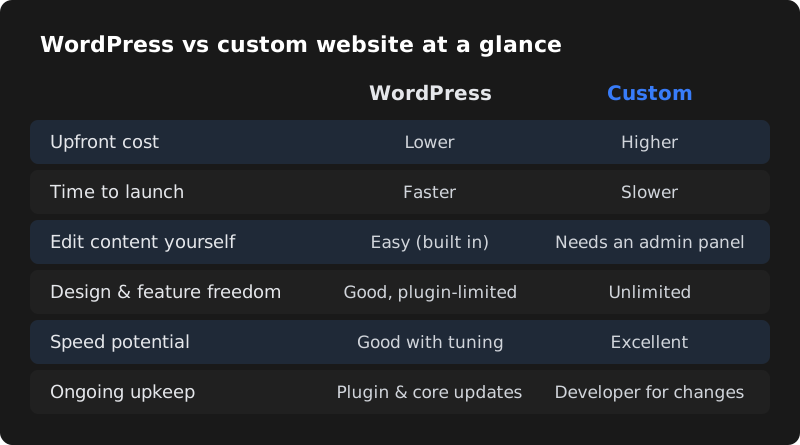
| Upfront cost | Lower | Higher |
| Time to launch | Days to a few weeks | Several weeks to months |
| Editing content yourself | Easy, built in | Needs a custom admin panel or a headless CMS |
| Design freedom | High with a good developer; limited with cheap templates | Complete |
| Special features | Thousands of plugins; complex logic can get messy | Anything you need, built exactly |
| Speed | Good if built carefully; slow if overloaded with plugins | Excellent when built well |
| Security | Needs regular updates; popular target for bots | Smaller attack surface, but depends on code quality |
| SEO | Very good with plugins like Yoast or Rank Math | Very good, but SEO features must be built in |
| Ongoing maintenance | Core, theme and plugin updates | Fewer routine updates; changes need a developer |
| Finding another developer later | Very easy | Depends on the technology and code quality |
When WordPress is the better choice
- You need a business website quickly
- Your budget is under about ₹40,000
- You want to edit text, photos and blogs yourself
- You plan to publish blog posts for SEO
- You want a standard online store with WooCommerce
- You want to be able to switch developers easily
Clinics, schools, coaching centres, consultants, real estate companies, restaurants, NGOs and most service businesses are well served by a well-built WordPress website.
When a custom website is the better choice
- Your website is your product (SaaS, platform, marketplace)
- You need user accounts, dashboards or complex workflows
- You need deep integration with your own software or APIs
- Performance at high traffic is critical
- You want a highly unique, interactive experience
- You have a budget and timeline for proper development
Examples: a booking platform with vendor logins, a billing or inventory system, a student portal, a real-time dashboard, or a product that will later become a mobile app.
Cost comparison in India (2026)
| Option | Typical build cost | Typical yearly running cost |
|---|---|---|
| WordPress with a quality template | ₹8,000 – ₹25,000 | ₹4,000 – ₹15,000 + maintenance |
| Custom-designed WordPress | ₹20,000 – ₹75,000 | ₹5,000 – ₹20,000 + maintenance |
| WooCommerce store | ₹30,000 – ₹1,00,000+ | Hosting, plugins and payment gateway fees |
| Custom-coded website | ₹50,000 – ₹2,00,000+ | Hosting plus developer time for changes |
| Custom web application | ₹1,00,000 – ₹5,00,000+ | Cloud hosting, monitoring, ongoing development |
These are typical market ranges, not fixed prices. The real cost depends on design, features and who builds it.
What about speed and SEO?
Google does not prefer WordPress or custom code. It cares about whether your pages are useful, load quickly, work well on mobile and are technically easy to crawl. Both approaches can achieve this — and both can fail at it.
- A WordPress site with a lightweight theme, few plugins, image optimisation and caching can load very fast.
- A custom site with huge images and no SEO tags can perform worse than a basic WordPress site.
Whichever you choose, ask your developer to test the site with Google PageSpeed Insights and set up Google Search Console before launch.
Hosting matters as much as the platform
A fast website on cheap, overcrowded hosting will still feel slow. For WordPress, choose hosting with good server resources, caching and servers close to your customers in India. Custom websites are often deployed on cloud platforms such as AWS, Google Cloud, DigitalOcean, Vercel or Netlify, which can be very fast and affordable when configured properly. Ask your developer where the site will be hosted, who owns the hosting account, and what happens if traffic suddenly grows — for example during a sale or after an advertisement.
Ownership and lock-in
With WordPress, you can move your site to another host or developer easily because the platform is standard. With custom code, make sure you receive the full source code, access to the code repository and clear documentation when the project is paid for. Without these, switching developers later can be expensive.
Real-world scenarios
A dental clinic that wants more appointments
The clinic needs service pages for each treatment, doctor profiles, patient reviews, a blog for SEO and an appointment form connected to WhatsApp. The staff wants to update offers and timings themselves. Best fit: WordPress. It launches in two weeks, costs less, and the receptionist can edit content without calling a developer.
A logistics startup that needs a customer portal
Customers must log in, book shipments, track them on a map, download invoices and raise support tickets, while the operations team uses an internal dashboard. Best fit: custom development. These workflows are the product itself; forcing them into plugins would create a slow, fragile system.
A boutique selling sarees online
The boutique has around 200 products with variations, needs UPI and card payments, shipping integration and WhatsApp order updates, and the owner wants to add new arrivals every week. Best fit: WooCommerce (WordPress) or Shopify. Building a custom store would cost several times more without giving the owner anything extra.
A coaching institute with an online test series
The marketing pages can be WordPress, while the test platform — student logins, timed tests, results and rankings — is custom-built and linked from the main site. Best fit: both. Using each tool for what it does best keeps cost down and performance high.
Maintenance: what each option needs
| Task | WordPress | Custom website |
|---|---|---|
| Security updates | Core, theme and plugins — ideally monthly | Framework and library updates — a few times a year |
| Backups | Automatic daily or weekly backups via plugin or hosting | Database and file backups set up on the server |
| Content changes | Done by you in the admin panel | Done in an admin panel if built; otherwise by a developer |
| New features | Often a plugin plus configuration | Developer builds and tests the feature |
| Uptime monitoring | Recommended for both | Recommended for both |
Either way, budget for maintenance from the start. An un-maintained website slowly becomes slower, less secure and harder to fix.
Questions to help you decide
- Is the website mainly for information and enquiries, or is it a tool customers log in to use? Information → WordPress. Tool → custom.
- Who will update the content? If it is you or your staff, WordPress is easier unless the custom build includes an admin panel.
- What is your budget for the first year, including maintenance?
- How quickly do you need to launch?
- Will you need features no plugin provides? If yes, custom development (or custom WordPress development) is needed.
How we choose at CodeServe
We build both, so we recommend whatever fits your business rather than what is easiest for us. Most of our small-business websites are built on WordPress so clients can edit them easily, while portals, dashboards and SaaS-style products are custom-built.
| Package | Price | Built with |
|---|---|---|
| Starter Website | ₹9,999 | WordPress or lightweight custom code |
| Business Website | ₹19,999 | WordPress CMS with advanced SEO |
| E-commerce Store | ₹34,999 | WooCommerce or Shopify |
| Web App Development | From ₹49,999 | Custom code |
Frequently asked questions
Is WordPress good for a business website in 2026?
Yes. For most small and medium business websites, WordPress is a cost-effective, flexible and SEO-friendly choice, as long as it is built with a quality theme, few plugins and regular updates.
Is a custom website more secure than WordPress?
Not automatically. Custom sites avoid common plugin vulnerabilities, but their security depends on the quality of the code and hosting. A well-maintained WordPress site is secure for most businesses.
Can I move from WordPress to a custom website later?
Yes. Many businesses start with WordPress and move to a custom platform when their needs grow. Your content can be migrated, and with proper redirects you keep your Google rankings.
Which is better for SEO, WordPress or custom?
Neither has a built-in advantage. Google ranks useful, fast, mobile-friendly pages. WordPress makes basic SEO easier with plugins; custom sites need SEO features built in by the developer.
