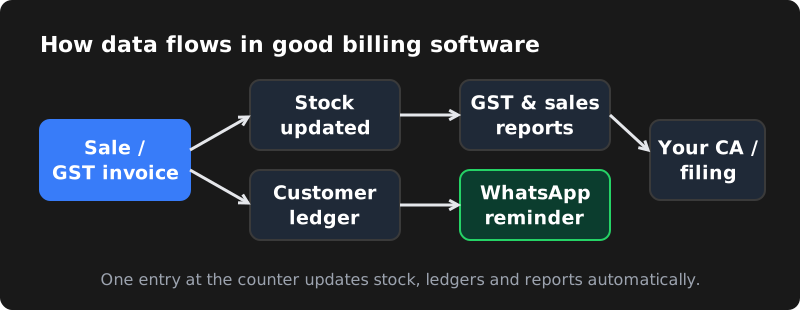
What good billing software should do
Whether you run a shop, a distributor business, a clinic, a restaurant or a service company, billing software usually needs to cover these basics:
- GST-compliant invoices with GSTIN, HSN/SAC codes and tax breakup
- Quotations, proforma invoices, credit and debit notes
- Customer and supplier records with outstanding balances
- Inventory and stock tracking, with low-stock alerts
- Payment tracking: cash, UPI, card and bank transfer
- Reports for sales, purchases, tax and profit
- Data export for your accountant or CA
- User roles so staff only see what they need
Beyond the basics, many businesses want invoices sent on WhatsApp, barcode scanning, multiple branches, or a connection to their online store. That is usually where the ready-made vs custom question begins.
Ready-made billing apps: pros and cons
Ready-made apps are subscription products used by thousands of businesses. You sign up, add your products and start billing the same day.
| Pros | Cons |
|---|---|
| Quick to start, often within a day | You adapt your process to the software, not the other way round |
| Low upfront cost; monthly or yearly subscription | Subscription costs add up every year, often per user or per branch |
| Vendor handles updates and GST rule changes | Features you need may be missing or locked in higher plans |
| Mobile apps and support usually included | Limited integrations with your own website, CRM or machines |
| Proven and widely used | Your data lives in the vendor's system and format |
Choose ready-made if your business is fairly standard — a single shop, simple products, a small team — and you want to start immediately with minimal spending.
Custom billing software: pros and cons
Custom billing software is built specifically for your business. It can be a web app you open in a browser, a mobile app, or both.
| Pros | Cons |
|---|---|
| Matches your exact workflow, pricing rules and reports | Higher upfront cost |
| No per-user subscription; you own the software | Takes weeks to build and test, not one day |
| Connects to your website, WhatsApp, CRM, barcode and printers | You need a reliable partner for updates and support |
| Your data stays in your own database | Compliance changes must be planned and implemented with your developer |
| Can grow into a full ERP over time | Requires clear requirements upfront |
Choose custom if your process is unusual (special pricing, schemes, job work, service billing, multiple branches or warehouses), you have many users, or you have outgrown ready-made tools.
Side-by-side comparison
| Factor | Ready-made app | Custom software |
|---|---|---|
| Time to start | Same day | Few weeks |
| Upfront cost | Low | Higher (one-time) |
| Ongoing cost | Subscription every year | Hosting + optional support plan |
| Fit to your process | Standard | Exact |
| Integrations | Limited to what the vendor offers | Anything with an API |
| Data ownership | Vendor platform | Your own database |
| Best for | Small, standard businesses | Growing or unique businesses |
Questions to ask a ready-made billing app vendor
If you are leaning towards a ready-made app, ask these questions before paying for a yearly plan:
- What does the plan cost per user, per device and per branch — and what will it cost when we grow?
- Which features are only in higher plans (inventory, multiple godowns, e-invoicing, reports)?
- Can we export all our data — invoices, customers, products — in Excel or CSV at any time?
- Does it work offline, and how does it sync when the internet returns?
- Can it connect to our online store, WhatsApp or accounting software?
- What support is included — phone, WhatsApp or email only — and in which language?
Write down the answers for two or three apps. If none of them handles your must-have features without workarounds, it is worth getting a quote for custom software too.
GST and e-invoicing: what to keep in mind
Whatever you choose, your invoices must meet GST requirements: correct GSTIN details, place of supply, HSN or SAC codes, tax rates and the right split between CGST, SGST and IGST. Some businesses must also generate e-invoices through the government's invoice registration system and e-way bills for moving goods, depending on their turnover and type of supply.
These rules and thresholds have changed several times and can change again. Before choosing software, confirm with your CA which requirements apply to your business today, and make sure the software (ready-made or custom) supports them — including how it will be updated when rules change.
Features that matter by business type
Different businesses need very different things from billing software. Use this as a starting point:
| Business | Features that usually matter most |
|---|---|
| Retail shop / supermarket | Fast POS screen, barcode scanning, thermal printing, discounts, daily cash closing |
| Wholesale / distributor | Party-wise pricing, credit limits, outstanding reports, e-way bill support, sales rep orders |
| Restaurant / cloud kitchen | Table and KOT management, online order integration, recipe-based stock deduction |
| Pharmacy | Batch and expiry tracking, schedule drug records, supplier returns |
| Clinic / diagnostic centre | Patient records, service billing, packages, doctor-wise reports |
| Service company | Recurring invoices, AMC contracts, payment reminders, job sheets |
If most of what you need is in the "standard" column of popular apps, ready-made will likely serve you well. If your list has many special rules, that is a strong sign custom software will save time in the long run.
How a custom billing project usually works
- Discovery: the developer studies your current process, invoices, reports and pain points.
- Scope and quote: features are listed in writing, with a fixed price and timeline for the first version.
- Design: screens are designed so billing is fast for your staff — fewer clicks, clear totals.
- Development: the system is built in stages, so you can test early versions.
- Data migration: customers, products and opening balances are imported from your old system.
- Testing with your CA: sample invoices and tax reports are checked before going live.
- Training and launch: staff are trained, and the old and new systems can run side by side briefly.
- Support: bug fixes after launch and an optional maintenance plan for updates.
Common mistakes to avoid
- Trying to build every feature in version one — start with what you use daily.
- Skipping backups — make sure data is backed up automatically every day.
- Not involving the staff who actually raise invoices — they know where time is wasted.
- Ignoring offline needs in areas with unreliable internet.
What does custom billing software cost?
Cost depends on features, number of user roles, integrations and whether you need a mobile app. As a rough guide, CodeServe's custom web applications start from ₹49,999 and mobile apps from ₹74,999. A simple single-branch billing and inventory system sits at the lower end; multi-branch systems with e-invoicing integration, offline mode and a mobile app cost more.
When comparing with a ready-made app, look at the total cost over three years: subscription per user and branch, add-ons, and the cost of workarounds your team does manually because the software doesn't fit.
Checklist before you talk to a developer
- How many invoices do you raise per day?
- How many users, branches and warehouses?
- Products, services or both? Any batches, expiry dates or serial numbers?
- Which payment modes and which bank or UPI flows?
- Do you need barcode, thermal printer or weighing scale support?
- Should invoices go to customers on WhatsApp or email?
- Which reports does your CA need, and in what format?
- Must it work offline when the internet is down?
Having these answers ready makes quotes faster and more accurate. Our billing software development page explains how we plan and build custom systems.
Frequently asked questions
Is custom billing software GST-compliant?
It can be, if it is built correctly. A good developer designs invoices, tax calculations and reports around GST rules and plans for future changes. Always have your CA review sample invoices before going live.
Can I move my data from my current billing app?
Usually yes. Most apps let you export customers, products and invoices to Excel or CSV, which can be imported into new software. Check what your current app allows before you start.
Can billing software send invoices on WhatsApp?
Yes. Custom software can send invoices and payment reminders automatically through the WhatsApp Business API, and some ready-made apps offer basic WhatsApp sharing.
How long does it take to build custom billing software?
A focused billing and inventory system can take a few weeks; larger systems with multiple branches, integrations and a mobile app take longer. Clear requirements shorten the timeline.
