What is Google Business Profile?
Google Business Profile (earlier called Google My Business) is the free listing that shows your business name, location, phone number, hours, photos and reviews on Google Search and Google Maps. Customers can call you, get directions or visit your website with one tap.
For local businesses — clinics, restaurants, salons, coaching centres, shops, real estate offices, service providers — it is usually the single most valuable free marketing tool available.
How Google decides who ranks first
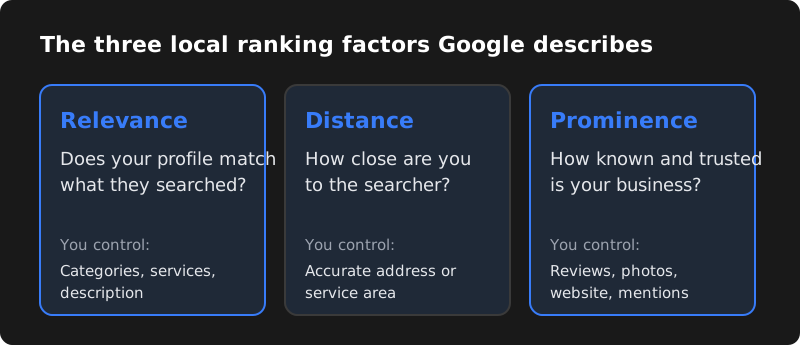
Google says local results are based mainly on three factors:
| Factor | What it means | What you can control |
|---|---|---|
| Relevance | How well your profile matches what the person searched | Correct categories, services, description, complete information |
| Distance | How far your business is from the searcher or the location in the search | Accurate address or service area (you cannot fake this) |
| Prominence | How well-known and trusted your business is | Reviews, ratings, photos, website quality, mentions on other sites |
No one can guarantee the top spot, and anyone who promises "number 1 on Google Maps in 7 days" should be avoided. But a complete, active profile with genuine reviews beats a half-filled one almost every time.
Step 1: Create and verify your profile
- Go to business.google.com and sign in with a Google account you will keep long-term (ideally a business email, not a staff member's personal account).
- Search for your business name. If a listing already exists, claim it instead of creating a duplicate.
- Enter your exact business name as it appears on your signboard and documents.
- Choose your primary category carefully (more on this below).
- Add your address. If you visit customers instead of them visiting you, set yourself up as a service-area business and hide the address.
- Add your phone number and website.
- Complete verification. Google may ask for a short video of your premises and signage, a phone or email code, or another method depending on your business.
Step 2: Fill in every section
Business name
Use your real name only. Adding keywords such as "CodeServe – Best Web Design Company Hyderabad" breaks Google's guidelines and can get your profile suspended.
Categories
Your primary category has a big effect on which searches you appear for. Pick the most specific one that describes your main service (for example "Website designer" rather than just "Consultant"), then add a few relevant secondary categories. Look at the top competitors in your area to see which categories they use.
Description
Write a natural description of up to 750 characters: what you do, who you serve, which areas, and what makes you different. Mention your main services and location naturally — do not stuff keywords.
Services and products
List every service with a short description and price where possible. This helps Google match you to more specific searches like "WhatsApp automation" or "root canal treatment".
Hours
Keep regular hours accurate and update special hours for festivals and holidays. Customers who arrive at a closed shop leave bad reviews.
Photos
Add a logo, a cover photo, the outside of your premises (so people can find you), the inside, your team and your work. Real photos perform better than stock images. Add new photos regularly.
Attributes and links
Add attributes that apply (for example wheelchair accessible, online appointments, women-owned) and links for booking or ordering if you have them.
Step 3: Get genuine reviews (the right way)
Reviews influence both your ranking and whether people choose you. Build them steadily:
- Ask every happy customer, every time
- Send your short review link on WhatsApp
- Put a QR code at your counter or on invoices
- Reply to every review within a day or two
- Thank people by name for positive reviews
- Respond calmly and helpfully to negative reviews
Never buy reviews, write fake reviews, offer discounts in exchange for reviews, or ask only happy customers while filtering out others. Google removes fake reviews and can restrict or suspend profiles that try to manipulate ratings.
A simple WhatsApp message you can use
Thank you for choosing us! If you were happy with our service, could you take 30 seconds to leave a Google review? It really helps a small business like ours: [your review link]
Step 4: Keep the profile active
- Posts: share offers, events, new services or recent work once a week.
- Photos: add fresh photos of real work every month.
- Updates: change hours, phone numbers or services immediately when they change.
- Insights: check how many calls, direction requests and website clicks you get, and which searches show your profile.
A 15-minute weekly routine
- Reply to all new reviews (5 minutes).
- Upload two or three new photos of recent work or your premises (3 minutes).
- Publish one short post — an offer, a tip or a recent project (5 minutes).
- Check that hours, phone number and services are still correct (2 minutes).
Small, regular activity signals to customers (and Google) that your business is open and active.
Example: a good business description
Sri Sai Physiotherapy Clinic in Kukatpally, Hyderabad, helps patients recover from back pain, neck pain, sports injuries and post-surgery stiffness. Our qualified physiotherapists offer one-to-one sessions, home visits across Kukatpally, KPHB and Miyapur, and personalised exercise plans. Open Monday to Saturday, 8 am to 8 pm. Book an appointment by phone or WhatsApp.
It explains what the business does, where, for whom and how to contact it — in natural language, without keyword stuffing. (This is a sample for illustration only.)
Step 5: Make your website support your profile
Your website and profile work together. Make sure:
- Your business name, address and phone number on the website exactly match your profile.
- You have a page for each main service, with your city or area mentioned naturally.
- The contact page has your address and an embedded Google Map.
- The website loads fast on mobile and has local business schema markup.
- Your business is listed with the same details on directories such as Justdial, Sulekha and IndiaMART, and on your social media profiles.
Mistakes that hurt your ranking
| Mistake | Why it hurts |
|---|---|
| Keywords stuffed into the business name | Against guidelines; risk of suspension |
| Fake or virtual-office address | Profiles without a real location can be removed |
| Duplicate listings for the same location | Splits reviews and confuses Google |
| Different phone numbers on website and profile | Reduces trust in your information |
| Ignoring negative reviews | Customers see no response and choose a competitor |
| Profile owned by an ex-employee or old agency | You lose control; always keep owner access yourself |
How long does it take to see results?
Changes to your profile can show within days, but ranking improvements usually build over weeks and months as you collect reviews, add content and strengthen your website. Businesses in less competitive areas tend to see results faster than those in crowded categories in central Hyderabad.
Track progress in the profile's performance section: the number of calls, direction requests, website clicks and the search terms people used to find you. If calls and direction requests rise month by month, your work is paying off — even before you notice a change in position. Write down your numbers on the first day of each month so you can compare honestly over time, and note what you changed (new photos, more reviews, new services) to learn what works for your business.
Frequently asked questions
Is Google Business Profile free?
Yes. Creating and managing a Google Business Profile is completely free. Google Ads that appear above the map are a separate, paid product.
Can I create a Google Business Profile without a shop or office?
Yes, if you serve customers at their location — for example plumbers, tutors or web developers who meet clients. Set up a service-area business and hide your address. You still need a real address for verification.
Why is my business not showing on Google Maps?
Common reasons are an unverified or suspended profile, a wrong primary category, an incomplete profile, very few reviews, or searching from far away. Check that your profile is verified and complete first.
How many reviews do I need to rank higher?
There is no fixed number. What matters is having more genuine, recent reviews with good ratings than the competitors around you, and replying to them. Focus on a steady flow of real reviews rather than a target number.
