"How much will my app cost?" is usually the first question business owners ask — and the honest answer is "it depends". Quotes in India can range from a few thousand rupees for a template app to many lakhs for a platform like a food-delivery or booking marketplace.
This guide explains the typical price ranges in 2026, what actually drives the cost, the running costs people forget, and how to start smart with an MVP so you don't overspend.
The short answer
For most small and medium businesses in India, a properly built custom mobile app (Android and iOS) usually costs somewhere between ₹75,000 and ₹5 lakh to build, depending on features. Simple apps sit at the lower end; apps with payments, real-time tracking, multiple user types or complex integrations cost more. On top of this, plan for yearly running costs such as servers, store fees and updates.
These are typical market ranges, not fixed prices — the only reliable number is a written quote for your exact requirements.
Typical cost by type of app
| Type of app | Examples | Typical market range* |
|---|---|---|
| Simple / informational | Catalogue, menu, brochure app, basic enquiry form | ₹50,000 – ₹1,20,000 |
| Business app with login | Customer accounts, bookings, orders, notifications, admin panel | ₹1,00,000 – ₹3,00,000 |
| E-commerce / payments | Product listings, cart, Razorpay/UPI payments, order tracking | ₹1,50,000 – ₹4,00,000 |
| Multi-user platform | Customer + vendor + delivery apps, live tracking, commissions | ₹4,00,000 and above |
*Indicative ranges for India in 2026 based on typical project scopes. Freelancers, small teams and large agencies price very differently.
What actually drives the cost
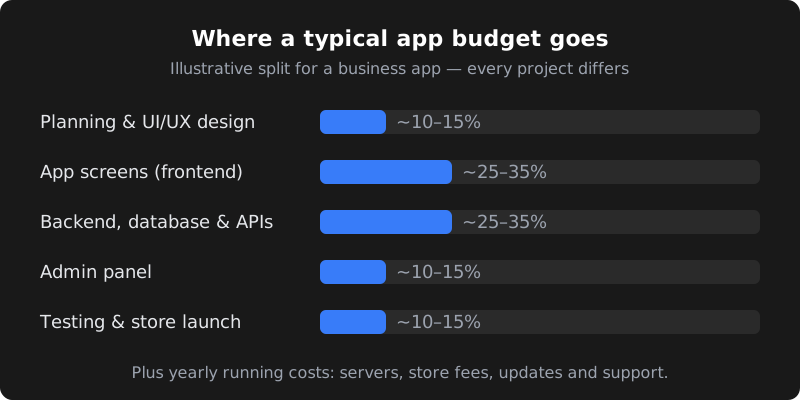
App pricing is mostly about time: how many developer and designer hours your features need. The biggest drivers are:
- Number of user types. One app for customers is far cheaper than separate experiences for customers, vendors, delivery staff and admins.
- Features with business logic. Bookings with time slots, discounts and refunds, multi-step orders, wallets or loyalty points take real effort to build and test.
- Integrations. Payment gateways, SMS/WhatsApp notifications, maps and live tracking, accounting or ERP connections.
- Custom design. A fully custom, animated design costs more than a clean design using standard components.
- Admin panel. Almost every business needs a web dashboard to manage users, orders and content — it is often forgotten in early estimates.
- Quality and testing. Testing on real Android and iPhone devices, handling poor internet and fixing edge cases adds time but saves embarrassment after launch.
Native vs Flutter / React Native
You can build two separate native apps (Kotlin for Android, Swift for iOS) or one cross-platform app that runs on both.
| Cross-platform (Flutter / React Native) | Separate native apps | |
|---|---|---|
| Codebase | One shared codebase for Android and iOS | Two codebases |
| Cost | Usually lower — one team builds both | Usually higher — roughly two builds |
| Speed to launch | Faster | Slower |
| Performance | Excellent for most business apps | Best for heavy graphics, games, advanced device features |
| Best for | Booking, e-commerce, service, community and business apps | Games, AR, very hardware-specific apps |
For most small and medium businesses, Flutter or React Native gives the best value. That's what we use for most client apps.
Running costs people forget
Building the app is a one-time cost. Running it is ongoing. Budget for:
| Cost | Approximate amount | Notes |
|---|---|---|
| Google Play developer account | About US$25, one-time | Check Google's current fee before registering |
| Apple Developer Program | About US$99 per year | Needed to publish on the App Store; check Apple's current fee |
| Servers / cloud hosting | ₹1,000 – ₹15,000+ per month | Grows with users and data |
| Third-party services | Varies | SMS/WhatsApp messages, maps, email, payment gateway fees |
| Maintenance and updates | Often 15–20% of build cost per year | New Android/iOS versions, bug fixes, security updates |
Start with an MVP to save money
An MVP (minimum viable product) is the smallest version of your app that solves the main problem for real users. Instead of building every idea at once, you launch the core, learn from real usage and then add features.
- List every feature you want.
- Mark each one "must have for launch", "nice to have" or "later".
- Build only the must-haves first, with a clean design and solid backend.
- Launch to a small group, collect feedback and usage data.
- Add features in phases based on what customers actually use.
This approach often cuts the first-phase budget significantly and reduces the risk of paying for features nobody uses.
Common features and how much effort they add
Every feature adds design, development and testing time. This rough guide helps you prioritise when planning your first version:
| Feature | Relative effort | Notes |
|---|---|---|
| Login with mobile OTP | Low–Medium | SMS or WhatsApp OTP has small per-message costs |
| Product or service catalogue | Low–Medium | Managed from the admin panel |
| Bookings with time slots | Medium | Rules for availability, cancellations and reminders |
| Online payments (UPI, cards) | Medium | Payment gateway integration, refunds and receipts |
| Push notifications | Low–Medium | Order updates, offers and reminders |
| Chat between users | Medium–High | Real-time messaging, moderation and storage |
| Live location tracking | High | Maps, background location and battery considerations |
| Multiple user apps (customer, vendor, delivery) | High | Often doubles or triples the work |
How to reduce cost without cutting quality
- Write down your requirements — even a simple list of screens and user actions makes quotes more accurate and comparable.
- Use proven services for payments, maps, notifications and login instead of building them from scratch.
- Start with one platform or a cross-platform build and expand once the app proves itself.
- Reuse your website backend if you already have one — your app and website can share the same data.
- Keep the design clean; heavy custom animations look nice but rarely change how many customers use the app.
- Plan phases with clear priorities so you can stop or change direction based on real usage.
Example: a salon booking app
Here is how a typical first version might be scoped for a salon chain with three branches in Hyderabad (illustrative):
- Customer app: OTP login, services and prices per branch, choose stylist and time slot, pay online or at the salon, booking history.
- Notifications: booking confirmation and a reminder two hours before the appointment, on WhatsApp or push.
- Admin panel: manage services, staff, branch timings, bookings and simple daily reports.
- Left for phase two: loyalty points, memberships, gift cards and in-app chat.
Keeping loyalty and chat out of the first release keeps the budget in the "business app" range and gets the app to customers sooner. Once bookings grow, the next phase is planned with real data.
Freelancer, agency or in-house?
| Option | Good for | Watch out for |
|---|---|---|
| Solo freelancer | Small, well-defined apps on a tight budget | Availability, backup if they get busy, design and testing gaps |
| Small team / studio | Most business apps — design, backend and testing together | Check past apps and who will actually work on yours |
| Large agency | Complex, high-budget platforms with many stakeholders | Higher cost and slower processes |
| In-house team | Apps that are your core product with constant development | Salaries, hiring time and management overhead |
Our article Freelancer vs Agency covers this decision in more detail.
How long does it take?
- Simple app: about 4–6 weeks
- Business app with login, bookings or orders: about 8–12 weeks
- Multi-user platform: 3–6 months or more, usually in phases
Add 1–2 weeks for app store review and publishing, and remember timelines depend on how quickly content and feedback are shared.
Questions to ask before you hire
- Will I own the source code and store accounts?
- Is the admin panel included in the price?
- Which features are included — in writing?
- How many revision rounds are included?
- Who publishes the app to Play Store and App Store?
- What support is included after launch, and for how long?
- What are the expected monthly running costs?
- Can I see apps you have built and talk to a past client?
CodeServe app pricing
At CodeServe, mobile app development starts from ₹74,999 for an MVP built with Flutter or React Native, including UI/UX design, an admin panel, testing on real devices, Play Store and App Store publishing and 30 days of free support. Larger apps are quoted after a short requirements call. Payment is 50% advance and 50% before launch.
Frequently asked questions
Can I get an app built for under ₹50,000?
Sometimes, for very simple apps or template-based apps with limited customisation. Be careful with very low quotes: check what is included, who owns the code, and whether an admin panel, testing and store publishing are part of the price.
Is it cheaper to build only an Android app first?
It can be slightly cheaper, and many Indian businesses start with Android because most of their customers use it. With Flutter or React Native, adding iOS later costs much less than building a second app from scratch.
Who owns the app after it is built?
You should. Make sure the contract states that you own the source code after full payment, and that the Play Store and App Store accounts are registered in your business name.
What are the yearly costs after launch?
Expect server costs, the Apple Developer fee (about US$99 per year), third-party service charges and maintenance — often around 15–20% of the build cost per year for updates and fixes. Check current store fees before registering.
How much does CodeServe charge for a mobile app?
Our mobile app development starts from ₹74,999 for an MVP on Android and iOS, with design, admin panel, store publishing and 30 days of support. See mobile app development in Hyderabad for details.
