When someone in Hyderabad searches "dentist near me", "AC repair in Kukatpally" or "best biryani in Madhapur", Google shows a map with three businesses before any normal website. Getting into that map pack is called local SEO, and for most small businesses it brings more phone calls than any other form of marketing.
This checklist covers everything we set up for local businesses, in the order we recommend doing it. Most of it is free — it just needs time and consistency.
How local search works in 2026
Google decides who appears in local results using three broad factors:
- Relevance — how well your business matches the search (your categories, services and the words on your profile and website).
- Distance — how close you are to the person searching or to the area they typed.
- Prominence — how well known and trusted you are online (reviews, mentions on other websites, links and activity).
You can't change your distance, but you can improve relevance and prominence a lot. Everything below is about those two.
1. Set up and optimise your Google Business Profile
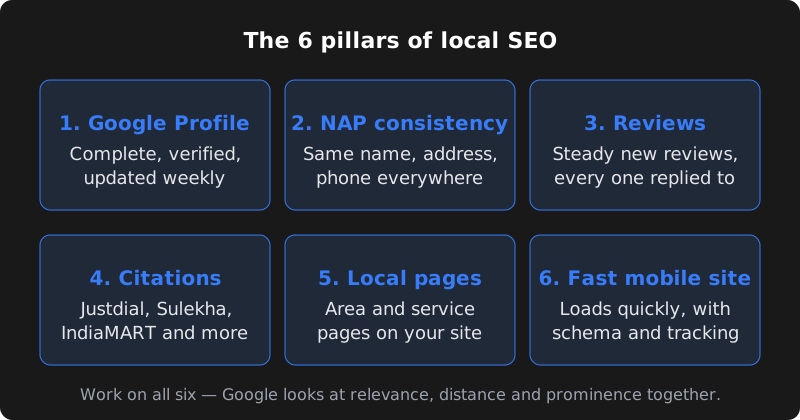
Your Google Business Profile (GBP) is the listing that shows on Google Maps and in the map pack. It is the single most important local SEO asset you have. Check each of these:
- Profile is claimed and verified in your real business name
- Primary category is the most specific one that fits (e.g. "Pediatric dentist", not just "Dentist")
- Secondary categories added for other main services
- Exact address, service area and business hours (including holidays)
- Phone number that is answered during business hours
- Website link to your most relevant page, not just the homepage
- Services and products listed with short descriptions and prices where possible
- At least 10–15 real photos: outside, inside, team, work samples
- Business description written for customers, mentioning your area naturally
- A new post or photo added every week
Our Google Business Profile guide explains each step in detail, including verification.
2. Keep your NAP consistent everywhere
NAP stands for Name, Address and Phone number. Google compares these details across your website, your profile and other directories. Small differences — "Shop No. 4" on one site and "#4" on another, or an old phone number on Justdial — make Google less sure the listings belong to the same business.
Write down one official version and use it everywhere, word for word:
| Detail | Do | Avoid |
|---|---|---|
| Business name | Your real trading name | Adding keywords like "Best Salon Hyderabad" to the name |
| Address | Same format, same landmark, same PIN code | Different spellings of the area or building |
| Phone | One main number, with +91 | Different staff mobiles on different sites |
| Website | The same URL everywhere | Mixing old domains or Facebook links |
3. Build local citations
A citation is any mention of your business name, address and phone number on another website. They help Google confirm you are real and active. Start with the platforms Indian customers actually use:
- General directories: Justdial, Sulekha, IndiaMART (for B2B and suppliers), Yellow Pages India
- Maps and apps: Apple Maps (via Apple Business Connect), Bing Places
- Industry platforms: Practo for doctors, Zomato and Swiggy for restaurants, home-services apps for repair and cleaning businesses, MagicBricks or 99acres for real estate
- Social profiles: Facebook page, Instagram business profile, LinkedIn company page
- Local sources: your trade association, chamber of commerce, local news or event sites
Quality matters more than quantity. Twenty accurate listings on relevant sites are better than two hundred on spammy directories.
4. Get reviews — and reply to every one
Reviews influence both your ranking and whether people actually call you. A steady flow of genuine reviews works better than a sudden burst.
- Create your short review link from your Google Business Profile ("Ask for reviews").
- Send it on WhatsApp right after a good experience — the same day works best.
- Make it easy: one line, one link, no long message.
- Reply to every review within a few days, good or bad, politely and specifically.
- Never buy reviews or offer discounts in exchange for 5 stars — it breaks Google's rules and can remove reviews or your listing.
If you send booking or order confirmations on WhatsApp, a review request can be added automatically a day later. We set this up as part of our WhatsApp automation service.
5. Add local and service pages to your website
Your website should clearly tell Google what you do and where. A single homepage that says "We offer many services" is hard to rank.
- Create one page per main service (e.g. "Root canal treatment", "Teeth whitening").
- If you serve several areas, create genuinely useful area pages — "Interior designers in Gachibowli" with projects, directions and FAQs for that area. Avoid copy-paste pages that only swap the area name.
- Put your full address, a Google Map, phone number and WhatsApp button on your contact page and footer.
- Use the area names customers really search: Kukatpally, Gachibowli, Madhapur, Ameerpet, Kondapur, Secunderabad, Dilsukhnagar, LB Nagar and so on.
6. Use local keywords naturally
Think about how customers search, not how you describe yourself. A good local keyword usually has a service and a place: "physiotherapy clinic Kondapur", "CA firm Ameerpet", "wedding photographer Hyderabad".
| Where | Example |
|---|---|
| Page title | Physiotherapy Clinic in Kondapur | Your Clinic Name |
| Main heading (H1) | Physiotherapy in Kondapur, Hyderabad |
| First paragraph | Mention the service and area once, naturally |
| Image alt text | "Physiotherapy treatment room at our Kondapur clinic" |
| Google profile | Services list and description |
Write for people first. Repeating "Hyderabad" in every sentence makes pages harder to read and does not help rankings.
7. Technical basics: schema, speed and mobile
Most local searches happen on phones, often on mobile data. Your website should:
- Load in a few seconds on a normal 4G connection
- Work perfectly on small screens, with tap-to-call and WhatsApp buttons
- Use HTTPS (the padlock)
- Include LocalBusiness schema markup with your name, address, phone, hours and map location
- Have a sitemap submitted in Google Search Console
- Compress images and avoid heavy sliders and auto-playing videos
Our guide to website speed and Core Web Vitals explains how to test and fix slow pages.
8. Track what's working
Local SEO is a slow, steady process, so measure monthly rather than daily:
- Google Business Profile Performance: calls, direction requests, website clicks and searches that found you.
- Google Search Console: which searches show your website and which pages get clicks.
- Google Analytics: visitors, enquiries and WhatsApp clicks from organic search.
- Your own records: ask every new customer "How did you find us?" and note it down.
Common local SEO mistakes to avoid
- Creating duplicate Google profiles for the same location — merge or remove duplicates, or they compete with each other.
- Using a virtual office or fake address to appear in another area. Google regularly removes these, sometimes along with your real listing.
- Ignoring negative reviews. A calm, helpful reply shows future customers you care; silence looks worse than the review.
- Setting the wrong primary category — it affects which searches you appear for more than almost anything else.
- Letting old listings go stale. An old phone number on a directory sends customers to a dead end and confuses Google.
- Copy-paste area pages that only change the area name. They add little value and can be treated as low quality.
- Expecting instant results. Local SEO compounds: consistent weekly effort beats a one-time burst.
If you only have one hour a week, spend it on your Google profile and reviews. Those two usually move the needle fastest for local businesses.
A simple monthly local SEO routine
| Frequency | Task |
|---|---|
| Weekly | Add a Google post or photos; reply to new reviews and questions |
| Weekly | Send review links to happy customers |
| Monthly | Check NAP on your top 10 listings; fix anything outdated |
| Monthly | Add or improve one service or area page on your website |
| Monthly | Review calls, clicks and enquiries; note which pages and keywords grow |
| Quarterly | Update photos, offers, hours and services everywhere |
Frequently asked questions
How long does local SEO take to show results?
Small improvements, like more profile views and calls, often appear within a few weeks of fixing your Google Business Profile. Ranking consistently in the map pack for competitive searches usually takes a few months of steady work. Nobody can honestly guarantee a specific position.
Is Google Business Profile free?
Yes. Creating and managing a Google Business Profile is free. You only pay if you choose to run Google Ads or hire someone to manage it for you.
Can I rank in areas where I don't have an office?
You can appear for searches in nearby areas, especially if you set a service area and have useful area pages on your website. The map pack strongly favours businesses that are physically close, so a real address in the area helps most. Never create fake addresses — Google removes them.
Do I need a website for local SEO?
You can start with just a Google Business Profile, but a fast website with clear service pages makes a big difference to relevance and trust. It also gives Google more information about what you do and where.
What does CodeServe charge for local SEO?
Local SEO is included in our Growth plan at ₹4,999 per month and Pro plan at ₹9,999 per month, which cover Google Business Profile management, monthly SEO work and reporting. See our digital marketing services for details.
